Best Buy removed RAM from a Lenovo Legion 5 after the owner sent the gaming laptop in for warranty repair. The customer says the laptop originally had 64GB RAM, but it came back with only 32GB installed.
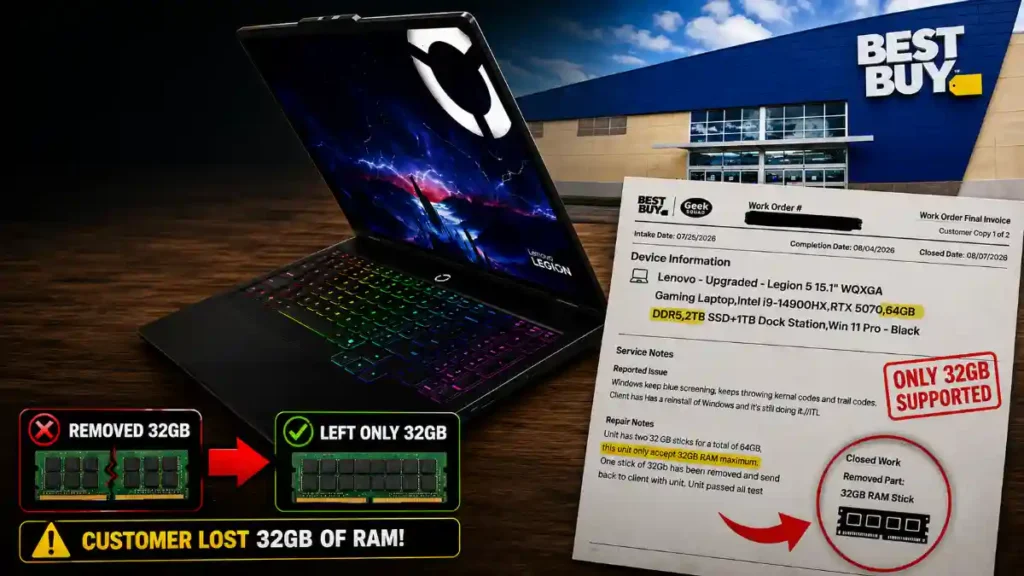
The repair report reportedly showed that the Lenovo Legion 5 arrived with two 32GB RAM sticks. However, the technician wrote that the laptop “only accepts 32GB RAM maximum.” One 32GB stick was removed before the laptop was returned.
The report also reportedly says that the removed RAM stick was sent back with the laptop. Even so, the situation has upset many gaming laptop users because the customer says he bought and used the Lenovo Legion 5 as a 64GB model for several months.
Here is what happened, why Best Buy removed RAM from the Lenovo Legion 5, and what buyers can learn from this unusual warranty repair story.
Best Buy Removed RAM From Lenovo Legion 5 After Blue-Screen Problems
The owner of the Lenovo Legion 5 said he sent the gaming laptop for warranty service after it began having blue-screen crashes.
Blue-screen errors can happen for many reasons. Common causes include faulty RAM, Windows problems, driver issues, overheating, SSD problems, motherboard faults, or graphics card driver crashes.
The customer said the laptop had 64GB DDR5 RAM installed before it was sent for repair. This setup included two 32GB RAM sticks.
According to the repair report, the technician found both 32GB memory modules inside the laptop. That confirms the device was sent in with 64GB RAM total.
However, the repair note reportedly said that the Lenovo Legion 5 only supports 32GB RAM maximum. After that, one 32GB memory stick was removed.
The laptop was then returned with 32GB RAM installed instead of the original 64GB.
The removed memory module was reportedly included with the returned laptop. This means Best Buy did not keep the RAM stick, but the owner still received the laptop in a lower-RAM configuration.
Why Did Best Buy Remove RAM From the Lenovo Legion 5?
The main reason appears to be the laptop’s official memory specification.
Some Lenovo Legion 5 models are officially listed with support for up to 32GB RAM. A technician checking Lenovo’s product specifications may see this limit and decide that a 64GB setup is unsupported.
That can lead to a situation where Best Buy removes RAM from a Lenovo Legion 5 during repair, even if the laptop arrived with more memory installed.
However, an official memory limit does not always mean the laptop cannot physically use more RAM.
Laptop manufacturers often list the highest configuration they sell at launch. For example, Lenovo may officially sell a certain Legion 5 model with up to 32GB RAM. But later, 32GB DDR5 laptop RAM sticks may become more common and affordable.
Because of this, some users install 64GB RAM even if the official product page only mentions 32GB.
In some cases, the laptop works normally. In other cases, larger RAM upgrades can cause issues such as crashes, failure to boot, random restarts, sleep-mode problems, or blue-screen errors.
This is why the issue is not completely simple. The customer says the Legion 5 worked with 64GB RAM for around eight months, but the blue-screen problem may have been related to the upgraded RAM, one faulty stick, or another hardware issue.
Best Buy Removed Half The RAM From A Gaming Laptop Because It Said The Laptop Only Supports 32GB
A customer sent a Lenovo Legion 5 in for warranty service with 64GB of RAM.
The Best Buy repair report confirmed the laptop had two 32GB RAM sticks, but the technician said the… pic.twitter.com/E77TsjqtYr
The Lenovo Legion 5 was reportedly purchased through Best Buy’s website with a 64GB RAM configuration.
However, an important detail is that the laptop may have been sold by a third-party Marketplace seller. This means the device may not have left Lenovo’s factory with 64GB RAM installed.
Third-party sellers often upgrade gaming laptops before selling them. They may add more RAM, install a bigger SSD, or include extra accessories.
For example, Lenovo may manufacture and ship a Legion 5 with 32GB RAM. A marketplace seller can open the laptop, remove the factory memory, install two 32GB sticks, and list the system as a 64GB gaming laptop.
This can be useful for buyers who need extra memory for demanding work. However, it can also make warranty repairs more difficult.
A repair center may only support the factory configuration. If the laptop arrives with upgraded parts, the service technician may remove those parts or refuse to test the device with them installed.
That appears to be the main reason why Best Buy removed RAM from the Lenovo Legion 5 in this case.
Does a Lenovo Legion 5 Need 64GB RAM?
For most gamers, 64GB RAM is not necessary.
Many popular games work well with 16GB RAM. A 32GB RAM gaming laptop is usually enough for modern games, streaming, Discord, Chrome tabs, game launchers, and background programs.
However, 64GB RAM can still be useful for some users.
People who edit 4K videos, make Roblox games, use Blender, run virtual machines, create large projects in Unreal Engine, or open many apps at once may benefit from 64GB RAM.
Some users also buy 64GB RAM for future use. A gaming laptop may last several years, and more memory can help with heavier software in the future.
The real concern is not whether 32GB is enough for gaming. The concern is that the buyer says he paid for a 64GB Lenovo Legion 5 and got a 32GB system back after warranty service.
Did the Removed RAM Fix the Laptop?
The repair report reportedly said that the Lenovo Legion 5 passed testing after one 32GB RAM stick was removed.
This does not fully prove that the 64GB RAM setup caused the problem.
There are several possible explanations.
One RAM module may have been faulty. Bad RAM can cause blue screens, game crashes, boot failures, freezing, and random restarts.
The two 32GB RAM sticks may also have had compatibility issues. RAM can look similar but still behave differently depending on speed, timing, voltage, and laptop BIOS support.
The original issue could also have been unrelated to RAM. Windows files, graphics drivers, heat, storage problems, or motherboard faults can all cause a laptop to crash.
The repair center may have decided that returning the laptop with Lenovo’s official 32GB memory configuration was the safest option. But that decision left the customer with a lower-RAM setup than before.
What Buyers Should Do Before Sending a Laptop for Repair
This story is a good reminder for anyone who owns a gaming laptop with upgraded parts.
Before sending a laptop for warranty repair, take photos of the device and its installed hardware. You should record the laptop serial number, RAM amount, SSD size, and any upgrades.
You can check installed RAM through Windows Task Manager. Open Task Manager, select the Performance tab, and click Memory. This shows the total amount of RAM installed in the laptop.
You should also save your order confirmation and screenshots of the product listing. This is especially important if you bought a laptop from a third-party seller on a retailer website.
If your Lenovo Legion 5 has extra RAM or a larger SSD, contact the repair center before shipping it. Ask whether those upgraded parts are covered by warranty and whether the technician will remove them during service.
It is also smart to back up your important files before sending a laptop for repair. Service centers may reset Windows, replace storage drives, or change hardware during troubleshooting.
Final Thoughts
Best Buy removed RAM from a Lenovo Legion 5 after a repair report said the gaming laptop only supports 32GB RAM maximum. The customer says the system was sent in with two 32GB sticks, but it came back with only one installed.
The removed RAM stick was reportedly returned with the laptop, but the case still raises important questions. The customer says the laptop was purchased as a 64GB model and worked that way for months before the repair.
The situation also shows the risk of buying upgraded gaming laptops through third-party Marketplace sellers. A laptop may be advertised with extra RAM, but a warranty repair center may only recognize the original factory configuration.
Before buying or repairing an upgraded gaming laptop, always check who sold it, which parts were upgraded, and whether those changes are supported by the manufacturer’s warranty.