DragonSword: Awakening Steam Workshop Mods: Rules, Co-op Limits, and What Players Can Create
DragonSword: Awakening is preparing official Steam Workshop mod support, which will let players create, upload, and share approved mods more easily. However, Hound13 has set clear limits: mods cannot copy paid DLC, include explicit nudity, or be used during co-op play.
The feature does not have a release date yet, but the developer has shared its planned modding rules ahead of launch. Here is what DragonSword: Awakening players should know before Steam Workshop support arrives.
DragonSword: Awakening Is Getting Steam Workshop Support
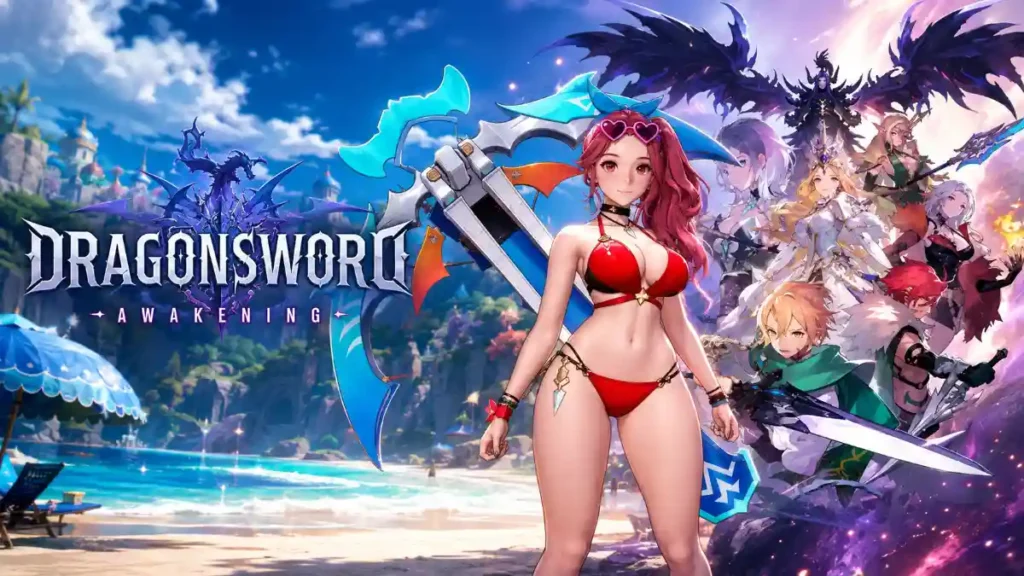
DragonSword: Awakening is an anime-style open-world action RPG from Hound13. Players explore the Continent of Orbis, recruit companions, use tag-team combat, and fight against the threat of a dragon that has awakened after 60 years.
Steam Workshop support will give players an official place to find and share community-made mods. Instead of manually hunting down files from different websites, players will be able to browse supported creations through Steam.
Mods can change parts of a game without replacing the whole game. They may add visual options, improve menus, adjust the camera, or create tougher challenges.
Hound13’s planned guidelines show that the game will support mods focused on visuals, accessibility, and optional challenges.
Players may be able to create and share mods such as:
Original, free character skins
New texture colors and visual changes
Cosmetic items, including glasses, capes, and decorations
Field-of-view changes
User interface improvements
Quality-of-life features
Higher difficulty settings
Extra combat or gameplay challenges
This means players could make a different outfit color for a favorite character, improve the way menus look, or build a harder combat experience for veteran players.
The key point is that mods should add new community-made ideas. They should not replace official paid content or damage the normal game experience.
Dragon Sword: Awakening is preparing to add mod support on Steam via the Steam Workshop.
The planned system will let players create and share mods with some Restrictions
Mods cannot recreate paid DLC or add explicit nudity.
Not every type of mod will be allowed on Steam Workshop. Hound13 has announced several important restrictions that creators need to follow.
Not allowed
What it means
DLC recreation
Mods cannot copy paid DLC items, content, or features to help players avoid buying them
Explicit nudity
Adult nude mods and explicit sexual content will not be permitted
Paid mods
Creators cannot charge money for Workshop mods
Difficulty reduction
Mods cannot make the game easier through unfair changes
Progression cheats
Mods cannot unlock achievements, rewards, or progress without earning them
Copyright violations
Mods cannot use content that belongs to another person or company without permission
Unreleased assets
Mods cannot share game files or assets that have not been officially released
These rules matter because Steam Workshop support is meant to give players a safer and more organized modding space. Mods that break the policy could be removed.
The biggest gameplay restriction is simple: modded games will not support co-op.
If you install a mod, you should expect to play DragonSword: Awakening solo. This rule likely helps keep multiplayer sessions fair and avoids problems caused by players using different mod files.
For example, one player may have a mod that changes enemy behavior or character visuals, while another player does not. That could cause bugs, mismatched information, or crashes during co-op.
Players who want to join friends should keep a clean, unmodded version of the game ready.
Game Updates Could Break Mods
Players should also remember that mods may stop working after a DragonSword: Awakening update.
This is common in PC games. When developers change game files, menus, systems, or character data, an older mod may no longer match the updated version. A broken mod could cause crashes, missing textures, strange UI behavior, or save-file problems.
Before installing any mod, take these steps:
Back up your save files.
Read the mod description and supported game version.
Install one mod at a time.
Test the game before adding more mods.
Remove outdated mods after a major patch.
Use Steam’s file-verification tool if the game starts crashing.
Third-party DragonSword: Awakening mod guides already recommend backing up saves, checking game-version compatibility, testing mods individually, and verifying game files after removing problem mods.
Will DragonSword: Awakening Mods Be Free?
Yes. Under the planned rules, Steam Workshop mods for DragonSword: Awakening must be free. Creators can share cosmetic changes, UI upgrades, quality-of-life tools, and challenge content, but they cannot sell those mods.
This should make it easier for players to try community creations without paying extra. It also helps make sure paid DLC remains official content sold by Hound13.
When Will Steam Workshop Support Launch?
Hound13 has not announced an official Steam Workshop release date for DragonSword: Awakening yet. The publication of mod guidelines suggests that the feature is being prepared, but players should wait for a direct announcement before expecting a specific update date.
Until then, players should be careful with unofficial downloads. Always check where a mod comes from, avoid unknown installers, and back up saves before changing game files.
Final Thoughts
Steam Workshop support could give DragonSword: Awakening a longer life by allowing players to share new outfits, UI improvements, and harder challenges. But players should understand the limits before downloading anything.
Keep your mods free, avoid DLC copies and explicit content, expect co-op to be disabled, and always protect your save files before testing new Workshop creations.