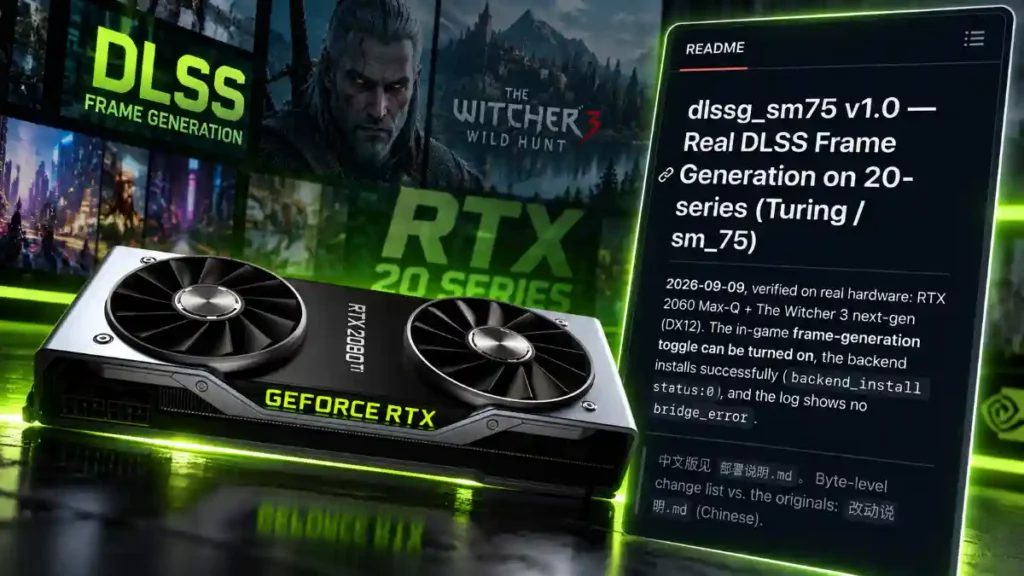
Owners of older NVIDIA GeForce RTX 20-series graphics cards may finally be able to try DLSS Frame Generation without buying a newer GPU. A new community-made mod has reportedly enabled NVIDIA’s DLSS Frame Generation technology on RTX 20-series “Turing” GPUs, including an RTX 2060 Max-Q laptop graphics card.
The mod is exciting news for gamers still using cards such as the RTX 2060, RTX 2070, RTX 2080, and their laptop versions. However, it is still an early project with limited testing, possible visual issues, and no official NVIDIA support.
RTX 20-Series DLSS Frame Generation Mod Explained
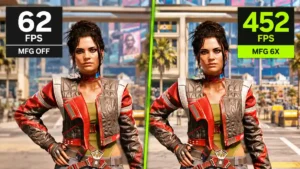
DLSS Frame Generation is a feature that creates extra frames between the frames rendered by a game. This can make gameplay look smoother and can increase the FPS shown on screen.
NVIDIA originally limited normal DLSS Frame Generation support to GeForce RTX 40-series and RTX 50-series graphics cards. RTX 20 and RTX 30 owners could use DLSS Super Resolution, which improves performance by rendering games at a lower resolution and upscaling the image, but they could not officially turn on NVIDIA’s Frame Generation feature.
That has now changed through a community project called DLSSG for SM75.
The project was created by modder Coldwood1026 and is designed for RTX 20-series Turing GPUs. The mod was reportedly tested on an RTX 2060 Max-Q laptop GPU in The Witcher 3 Next-Gen running in DirectX 12.
What Is DLSS Frame Generation?
Before looking at the mod, it is useful to understand what Frame Generation does.
Traditional game performance is measured in frames per second. For example, if a game runs at 60 FPS, the graphics card renders 60 separate frames every second.
DLSS Frame Generation adds AI-generated frames between normally rendered frames. In the best cases, this can make a game appear much smoother and increase the displayed frame rate.
For example:
- A game may render at around 45 FPS.
- DLSS Frame Generation can insert generated frames between those real frames.
- The game may look closer to 80 or 90 FPS on a compatible display.
Frame Generation does not make the GPU magically render every frame faster. Instead, it creates additional frames using motion data, image information, and NVIDIA’s AI technology.
This is why Frame Generation works best when the game already has a decent base frame rate. If a game is running badly at 20 FPS, generated frames may make motion appear smoother, but input delay and visual issues can still be noticeable.
How the RTX 20 DLSS Frame Generation Mod Works
The RTX 20-series mod reportedly uses NVIDIA’s own DLSS Frame Generation runtime rather than simply replacing it with AMD FSR Frame Generation.
According to the project details, the mod changes the compatibility path that normally blocks older Turing GPUs. It uses Turing-compatible code for the RTX 20 architecture and changes certain checks so the DLSS Frame Generation runtime can start on supported RTX 20-series hardware.
In simple terms, the mod does the following:
- Helps NVIDIA’s DLSS Frame Generation files work with RTX 20-series Turing GPUs.
- Changes architecture checks that normally limit the feature to newer cards.
- Uses a modified backend for RTX 20 hardware.
- Allows compatible games to load the Frame Generation runtime.
- Has been tested with The Witcher 3 Next-Gen in DirectX 12.
This is a major technical achievement because it suggests that at least some parts of DLSS Frame Generation can run on older RTX hardware when software restrictions and compatibility problems are addressed.
Which RTX 20 Graphics Cards Could Benefit?
The mod is made for NVIDIA’s Turing-based RTX 20-series GPUs. This includes many desktop and laptop graphics cards.
Potentially supported RTX 20-series cards include:
- GeForce RTX 2060
- GeForce RTX 2060 Super
- GeForce RTX 2070
- GeForce RTX 2070 Super
- GeForce RTX 2080
- GeForce RTX 2080 Super
- GeForce RTX 2080 Ti
- RTX 2060, 2070, and 2080 laptop GPUs
- RTX 2060 Max-Q and other Max-Q laptop versions
The project was specifically demonstrated on an RTX 2060 Max-Q. That is important because the RTX 2060 Max-Q is a lower-power laptop GPU, not a high-end desktop graphics card.
Still, gamers should not assume that every RTX 20 card, every game, and every laptop will work perfectly. More testing is needed.
NVIDIA’s Official DLSS Support Rules
NVIDIA officially supports normal DLSS Frame Generation on GeForce RTX 40-series and RTX 50-series GPUs. RTX 20 and RTX 30 cards are not officially listed for the feature.
RTX 20-series GPUs can officially use several other DLSS features, including DLSS Super Resolution in supported games. They can also use ray tracing, although performance depends heavily on the game, resolution, graphics settings, and exact GPU model.
Here is a simple comparison of current official support:
| DLSS feature | RTX 20 series | RTX 30 series | RTX 40 series | RTX 50 series |
|---|---|---|---|---|
| DLSS Super Resolution | Yes | Yes | Yes | Yes |
| DLAA | Yes in supported games | Yes in supported games | Yes in supported games | Yes in supported games |
| Ray Reconstruction | Available in supported titles | Available in supported titles | Available in supported titles | Available in supported titles |
| Standard DLSS Frame Generation | No official support | No official support | Yes | Yes |
| DLSS Multi Frame Generation | No | No | No | Yes |
NVIDIA says DLSS Frame Generation increases frame rates in supported games and applications on RTX 40-series and RTX 50-series graphics cards and laptops.
Does This Prove NVIDIA Locked It Behind Software?
The mod proves that the situation is not as simple as saying older RTX cards are completely unable to run any form of NVIDIA DLSS Frame Generation.
A modder has shown the technology running on an RTX 2060 Max-Q after changing compatibility-related software components and using Turing-compatible code. That is a real and meaningful result.
However, it does not prove that NVIDIA’s RTX 40-series implementation will work equally well on all RTX 20 or RTX 30 cards.
There are still important differences between GPU generations. Newer GPUs may offer better performance, stronger hardware support, more memory bandwidth, improved efficiency, and better performance for AI-related workloads. NVIDIA also tests and supports its official features across a wide range of games, drivers, and hardware combinations.
The most accurate conclusion is this: the official lock is not an absolute technical wall, but old GPUs may still have real performance and quality limits.
Early Performance Results Are Mixed
The RTX 20-series DLSS Frame Generation mod is still in its early stages. It should be treated as an experimental tool, not as a finished feature ready for every game.
Early reports suggest that the normal 2X Frame Generation mode is the most usable option. This means the game generates one extra frame between real rendered frames.
Higher frame-generation modes can be less reliable:
- 2X Frame Generation appears to be the best current option.
- 3X Frame Generation may produce ghosting or image artifacts.
- 4X Frame Generation may not work correctly on RTX 20-series hardware.
- Performance gains can vary depending on the game and graphics settings.
- Some early testing suggests that FSR-based frame-generation mods may still perform better in certain situations.
Ghosting happens when moving objects leave blurry trails behind them. This can be especially visible around characters, weapons, foliage, fast camera movement, menus, and HUD elements.
For this reason, gamers should test the mod slowly before deciding whether it improves their experience.
What Games Can Use the RTX 20 Frame Generation Mod?
At the time of writing, the mod has been publicly tested with The Witcher 3 Next-Gen using the DirectX 12 version of the game.
This does not mean it will automatically work in every DLSS game.
Game support can depend on many factors:
- Whether the game supports DLSS Frame Generation.
- Whether the game uses DirectX 12 or another compatible graphics API.
- The game’s own DLSS implementation.
- The version of the game and DLSS files installed.
- NVIDIA driver version.
- Other mods, overlays, reshade tools, or graphics injectors.
- The exact RTX 20-series GPU being used.
A game that supports DLSS Super Resolution does not always support DLSS Frame Generation. Developers need to add Frame Generation support separately.
Important Risks Before Installing the Mod
This mod is not made or supported by NVIDIA. It may require users to place or replace DLL files inside a game folder, which means it should only be used by people who understand the risks.
Before testing it, keep these points in mind:
- Back up the original game files before changing anything.
- Use the mod only in games where DLL modifications are safe and allowed.
- Avoid using it in competitive multiplayer games with anti-cheat software.
- Do not expect help from NVIDIA or the game developer if the game crashes.
- Game updates may break the mod.
- Driver updates may affect compatibility.
- Visual artifacts, stutters, crashes, and unstable frame pacing are possible.
- Laptop users should check temperatures, power limits, and fan noise.
It is safer to test this type of mod in a single-player game, especially one without an aggressive anti-cheat system.
Is DLSS Frame Generation Worth It on an RTX 2060?
It can be worth testing if you already own an RTX 2060 or another RTX 20-series GPU and mainly play single-player games. A working Frame Generation mod could help make demanding games feel smoother, especially when used with DLSS Super Resolution.
For example, an RTX 2060 owner could lower ray tracing settings, enable DLSS Quality or Balanced mode, and then test 2X Frame Generation. If the game already runs at a stable base frame rate, the result may look smoother than playing without generated frames.
However, it is not a complete solution for very demanding games.
If a game runs at only 20 to 25 FPS before Frame Generation, the experience may still feel slow because input latency comes from the real base frame rate. In that situation, lowering graphics settings, reducing ray tracing, using DLSS Performance mode, or lowering resolution may offer a better result.
Frame Generation is most useful when a game is already playable but needs extra smoothness.
RTX 20 Owners Do Not Need to Upgrade Immediately
The new mod is good news for gamers who cannot afford a new graphics card or do not want to replace a working RTX 20-series GPU. It shows that older Turing hardware still has more potential than official feature lists may suggest.
RTX 20 cards can still deliver solid gaming performance in many titles when paired with smart settings:
- Use DLSS Super Resolution whenever possible.
- Turn down ray tracing before lowering every other setting.
- Use medium or high textures based on available VRAM.
- Reduce heavy settings such as shadows, volumetric fog, and reflections.
- Cap FPS for steadier frame times.
- Keep NVIDIA drivers and games updated.
- Test community mods carefully in supported single-player titles.
An RTX 2060, RTX 2070, or RTX 2080 is still capable of playing many modern games at 1080p, especially with balanced settings and DLSS enabled.
Final Thoughts
The RTX 20-series DLSS Frame Generation mod is one of the most interesting NVIDIA community projects in recent memory. It reportedly enables NVIDIA’s own Frame Generation runtime on older Turing GPUs, including the RTX 2060 Max-Q, despite NVIDIA officially limiting the feature to RTX 40- and RTX 50-series cards.
The mod does not mean RTX 20 GPUs will suddenly match the performance, smoothness, or support level of modern RTX 40 and RTX 50 cards. It is still experimental, game compatibility is limited, and early tests show that higher Frame Generation modes can cause ghosting and other problems.
Still, the project gives older NVIDIA GPU owners a reason to keep watching the modding scene. If development improves and more games are tested, RTX 20 and RTX 30 users could gain another useful way to extend the life of their gaming PCs without spending thousands on a new graphics card.