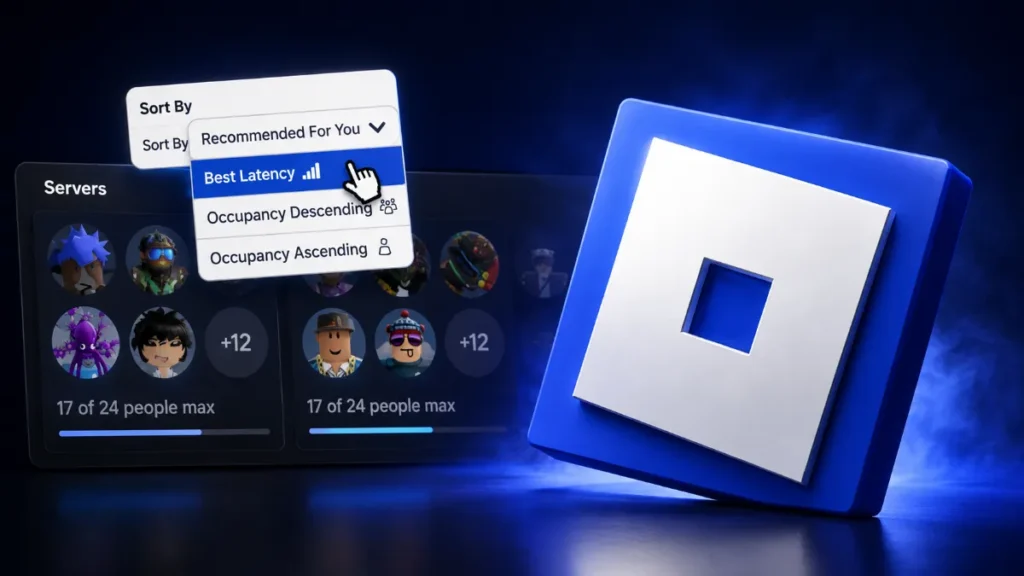
Roblox just made it easier for players to find the right server. The platform has rolled out two new Roblox server list sorting options called Recommended For You and Best Latency (also labeled Best Ping). These join the classic High to Low and Low to High player-count sorts that everyone already knows. The update is part of ongoing improvements to the server list page and is now live for many users.
If you have spent any time scrolling through public servers looking for a smooth game or a more active lobby, this change matters. Roblox has been testing these features for a while, and the Best Latency option especially has been in development for over a year. Early tests showed it could be inaccurate at times, occasionally ranking higher-ping servers near the top. Recent player reports suggest the accuracy has improved a lot, which is good news for anyone tired of joining laggy servers by accident.
What the New Roblox Server List Sorting Options Actually Do
The server list lives on every experience’s page under the Servers tab. Until now, the main ways to organize that list were by player count. High to Low puts the fullest servers at the top, which is useful when you want a lively game. Low to High does the opposite and is popular for people who prefer quieter lobbies or want to start fresh.
Recommended For You works differently. It tries to show you servers that Roblox believes you will enjoy based on your past activity. This can include servers you have joined before, ones your friends are in, or servers that match patterns in your play history. It is a personalized ranking rather than a pure numbers sort. The goal is to surface experiences that feel more relevant to you without forcing you to dig through dozens of random instances.
Best Latency (Best Ping) focuses purely on connection quality. It estimates how strong your connection will be to each server and ranks the lower-latency options higher. For competitive games or any experience where timing and responsiveness matter, this is the sort many players have wanted for years. Instead of hoping the random matchmaker drops you into a nearby region, you can deliberately choose a server that should feel smoother.
These two new options sit alongside the existing player-count sorts, so you still have full control. You can switch between them depending on what you need in the moment.
How These Changes Fit Into Broader Server List Improvements
Roblox has been testing several updates to the server list page for months. The company announced earlier that it planned to add more ways to sort and filter servers while also limiting how many servers a user can browse at once and restricting the underlying API to logged-in users only. The stated reason was safety and privacy. Making it harder for people to scan large numbers of servers reduces the chance of unwanted targeting or disruption.
The new sorting options appear to be the “additional ways to sort and filter” part of that plan. Creators still keep full access to servers in experiences they can edit, and sections like Private Servers and Servers My Connections Are In remain unchanged. The overall direction is clear: give players better tools to find good servers while tightening some of the more open browsing that existed before.
What Players Should Know About Using the New Sorts
Once the options appear in your Servers tab, switching is straightforward. Open any experience page, scroll to the server list, and look for the sort dropdown or buttons. Select Best Latency when lag is your biggest concern. Use Recommended For You when you want a more tailored experience that might include friends or familiar server styles.
A few practical tips help right away. If you do not see the new options yet, try disabling browser extensions and refreshing the page. Some extensions that modify the Roblox site can interfere with the updated interface. After joining a server through Best Latency, still check your actual in-game ping with the performance stats (usually Shift + F3 or the developer console). Estimated latency is useful, but real-world routing can sometimes differ.
Players who mainly care about population can stick with the High to Low or Low to High sorts. The new options simply give more choices. In busy experiences with hundreds of servers, being able to prioritize low ping or personalized recommendations can save a lot of time and frustration.
What Creators and Community Managers Should Expect
Game developers and community managers will notice shifts in how players distribute across servers. When more people start choosing Best Latency, servers in popular regions or with better network paths may fill faster. Recommended For You could also concentrate players into certain types of servers based on shared history or social connections.
This can change the feel of your experience. Some servers may become more consistently populated while others see fewer random joins. Creators who rely on organic server filling might want to monitor player distribution more closely over the coming weeks. The update does not remove any existing tools, but it does give players stronger reasons to self-select into better-matched instances.
If your game is sensitive to latency, such as competitive or fast-paced titles, the Best Latency sort could improve overall player satisfaction. Fewer people joining high-ping servers means fewer complaints about lag and more stable sessions.
Why This Update Matters for Everyday Play
Finding the right server has always been part of the Roblox experience. Random joining works fine for casual games, but anyone who has dealt with rubber-banding, delayed inputs, or half-empty lobbies knows the value of a better system. The new Roblox server list sorting options address that need directly.
Best Latency finally gives players a built-in way to favor connection quality without relying on third-party extensions or manual trial and error. Recommended For You adds a layer of personalization that can make the platform feel more social and relevant. Together with the classic player-count sorts, the server list is more flexible than it has ever been.
The rollout is still relatively fresh, so not every account may see the options immediately. Roblox often uses staggered testing and regional rollouts. Checking the Servers tab regularly and keeping an eye on official channels will help you know when it appears for you.