An older PlayStation 5 can develop serious overheating problems when its liquid metal thermal interface breaks down and damages the heatsink. Recent repair work on a CFI-1116 console shows exactly how this happens. The APU itself stayed healthy, yet the heatsink ended up permanently scarred after hardened liquid-metal residue was scraped away. For owners of early PS5 models, this case offers a clear warning about long-term cooling risks that go beyond simple dust or fan issues.
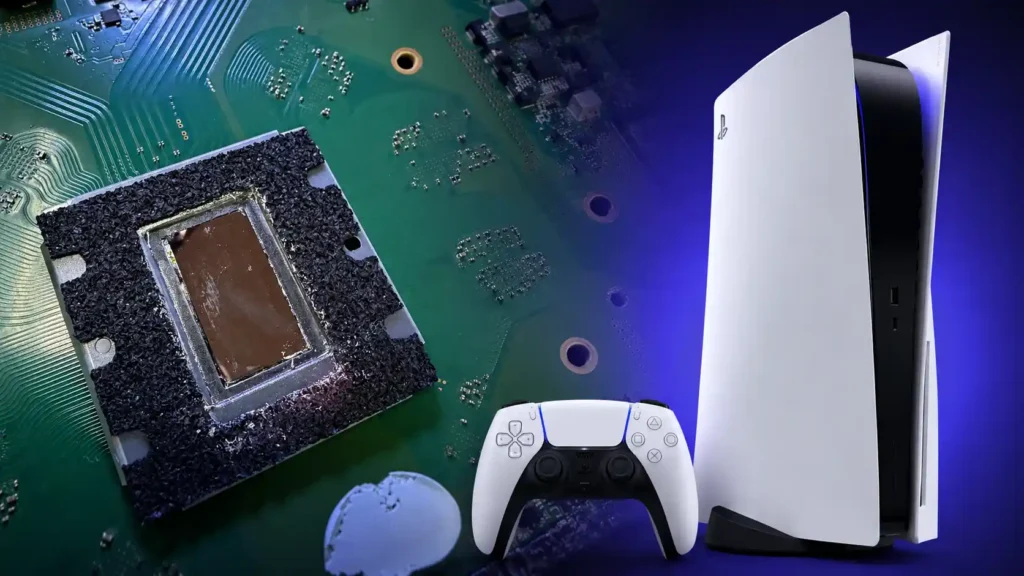
Polish technician Modyfikator89 documented the repair with photos and video. The console had been overheating during normal use. When the heatsink and APU were separated, both showed heavy discolouration around the contact zone. A large portion of the liquid metal had dried into a hard, crusty layer that refused gentle cleaning. Scraping became necessary, and that process left lasting marks across the cooler’s surface. The APU cleaned up well and looked undamaged, which is good news. A damaged heatsink, however, creates its own set of problems for any future thermal solution.
Sony chose liquid metal instead of ordinary thermal paste because it moves heat far more efficiently. The PS5’s APU packs a powerful CPU and GPU into a small package that generates serious heat under load. Liquid metal helps keep temperatures in check when everything is working as designed. Over time the material can change. It may oxidise, dry out, or shift unevenly across the die. iFixit has noted that liquid metal sometimes develops a cracked or dry look, especially if the console sits upright for long periods. When coverage becomes uneven, heat transfer suffers. The result can be higher temperatures, throttling, or unexpected shutdowns.
Liquid metal is also electrically conductive. If it escapes the intended area and reaches nearby components, it can cause a short. That is why the PS5 includes a foam barrier around the APU and why any reapplication demands careful work. The material is powerful when applied correctly, yet unforgiving when it migrates or hardens.
An older PS5 has developed a serious overheating problem because its liquid metal cooling damaged the heatsink.
A repair technician found that the liquid metal had dried up in one area and damaged the heatsink. Luckily, the PS5’s main chip was still fine.
The CFI-1116 case goes beyond simple migration. The most likely cause is a chemical reaction. Gallium, a key ingredient in many liquid-metal compounds, can interact with aluminium or copper once it gets past the protective plating on the heatsink. Nickel plating is normally used as a barrier, but if that coating wears or fails, the gallium begins attacking the metal underneath. In this repair the hardened residue stuck firmly to the heatsink. Removing it left permanent scars. Notebookcheck observed that the APU die remained smooth while the heatsink’s contact surface showed clear signs of compromised plating.
A scarred surface creates a cycle. Fresh liquid metal applied to damaged metal may react again, leading to new residue and faster failure. The technician therefore considered switching to a phase-change material such as PTM7950 rather than risking another round of liquid metal on the compromised cooler.
Not Every Older PS5 Is Doomed
One documented failure does not mean every CFI-1116 or launch-era console will suffer the same fate. The CFI-1116 belongs to the CFI-1100A revision introduced in 2021, which featured a lighter redesigned heatsink. Questions have been raised about whether the plating thickness or material on some of these coolers was tough enough for years of contact with gallium-based liquid metal. Right now there is no proof of a widespread manufacturing defect. It could be a limited batch issue or an isolated case.
Technicians have seen liquid-metal migration across different PS5 models. In some repairs the material simply slides away from part of the APU, leaving dry spots. Vertical orientation is often blamed, yet age, repeated heat cycles, original application quality, and the condition of the protective surface all appear to play roles. Orientation alone does not explain every failure.
How Sony Updated Later Cooling Designs
Sony has adjusted the cooling approach in newer hardware. Later models feature a heatsink contact surface with deeper grooves or ridges, inspired in part by the PS5 Pro design. These grooves are meant to hold the liquid metal in place and reduce migration away from the APU. The revised design appears on models such as the PS5 CFI-2100, CFI-2200, and certain PS5 Slim units including the CFI-2116 B01Y. Availability still varies by region and production run. Sony has not announced a recall for older consoles, so owners of early models should not assume their system needs immediate service solely because of the model number.
Warning Signs Owners Should Watch
A failing thermal interface can look a lot like other cooling problems. Dust, a weak fan, blocked vents, or power-supply issues produce similar symptoms. Watch for overheating warnings during demanding games, sudden shutdowns after long sessions, unusually loud fan noise, performance drops that feel like throttling, crashes that only appear once the system is hot, and normal behaviour after the console cools down. None of these prove liquid metal is the culprit. A proper diagnosis starts with checking airflow, the fan, dust levels, the power supply, thermal pads, and the actual contact between APU and heatsink.
Owners should not open the console themselves unless they have the right tools and experience. iFixit’s liquid-metal procedure involves extensive disassembly, complete removal of old residue, protection of the motherboard, and precise reapplication. Because the material conducts electricity and is hard to control, a mistake can short components or leave the system with poor thermal contact. Professional help is the safer route when overheating becomes a pattern.
What This Means for PS5 Owners
The damaged CFI-1116 shows the long-term maintenance reality of liquid-metal cooling in early PlayStation 5 consoles. It is not proof that every older system will fail. In the reported repair the APU survived, yet the scarred heatsink made the fix more complicated and raised questions about the best replacement thermal material.
Owners of early models should keep vents clear, maintain good airflow around the console, and treat repeated overheating warnings seriously. If shutdowns start happening, professional diagnosis is the next step. Anyone buying a new or used PS5 may want to check the model number and prefer later revisions that use the grooved heatsink design, though no cooling solution is perfect forever.
Liquid metal remains an impressive engineering choice. It transfers heat exceptionally well when everything is right. Over years of heat cycles, however, oxidation, uneven distribution, or chemical attack on the heatsink can turn that advantage into a repair challenge. Staying alert to temperature behaviour and acting early remains the best way to keep an older PS5 running smoothly for years to come.
Hi there! I'm Sohel, a multi-faceted gamer, blogger, and website wizard. My passion lies in the vibrant worlds of gaming and anime, and I specialize in crafting engaging content and managing websites that cater to these communities.
When I'm not immersed in virtual adventures or crafting compelling words, you can find me sketching intricate designs or indulging in the captivating realms of movies, web series, and poetry.
I'm always eager to connect with fellow enthusiasts, share my knowledge, and collaborate on exciting projects. Feel free to reach out and let's create something amazing together!