Nintendo has released a major free update for Mario Kart 8 Deluxe, bringing new Nintendo Switch 2 features, better visuals, faster loading, CameraPlay support, and a wild new eight-player split-screen mode.
The biggest news is that up to eight people can now race together on a single Nintendo Switch 2 system. The update also makes races slightly faster, improves the Boo item, and adds a massive 96-race option for players who own the Booster Course Pass.
Mario Kart 8 Deluxe has been one of Nintendo’s most popular racing games for years, and this update gives both new and returning players a good reason to jump back onto the track.
Mario Kart 8 Deluxe Version 4.0.0 Update Is Now Available
The new update is called Version 4.0.0. It is a free update for Mario Kart 8 Deluxe, but several of its biggest features are made for Nintendo Switch 2.
Players can download the update by connecting their console to the internet and updating the game software. If automatic updates are turned on, the game may already begin downloading the patch when the console is connected to Wi-Fi.
The update adds these main features:
- Eight-player local split-screen racing on Nintendo Switch 2
- Clearer visuals on the Switch 2 screen and high-resolution TVs
- Faster loading before races and battles
- CameraPlay support with a compatible USB camera
- A small increase to racing speed
- A useful improvement for the Boo item
- A new 96 Races setting in VS Race for Booster Course Pass owners
Nintendo has not turned Mario Kart 8 Deluxe into a completely new game. Instead, Version 4.0.0 improves the parts that players still use the most: local multiplayer, racing performance, party play, and long custom race sessions.
Up to 8 Players Can Race on One Nintendo Switch 2
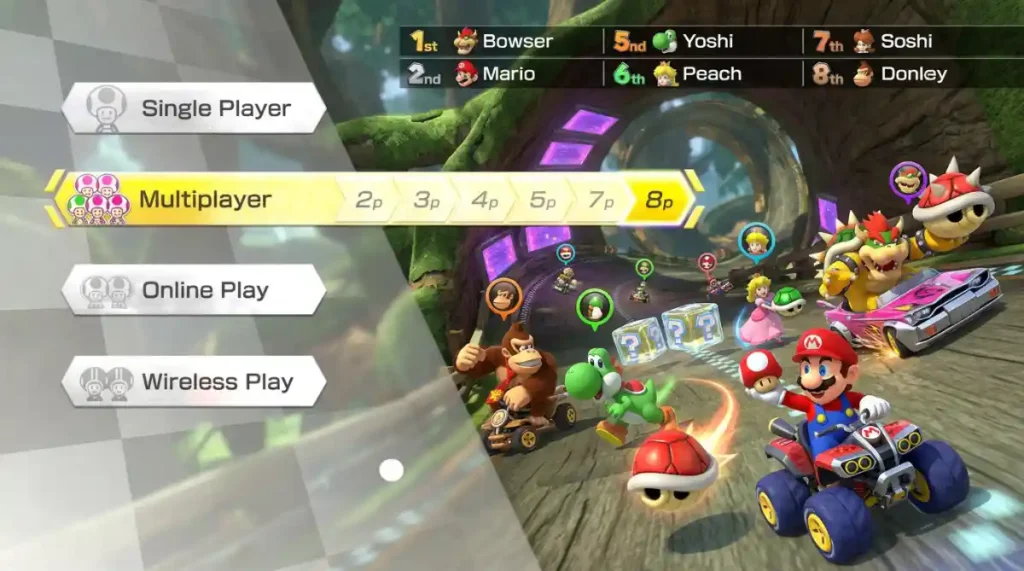
The biggest feature in the Mario Kart 8 Deluxe update is support for five to eight players in local Multiplayer on one Nintendo Switch 2 console.
Before this update, local split-screen races were limited to four people on one system. Now, a group of up to eight players can race at the same time while sharing one TV or one console display.
This means Mario Kart 8 Deluxe can now become even more exciting for:
- Family game nights
- Birthday parties
- School or college gaming events
- Friends visiting at home
- Gaming cafés
- Small local tournaments
- YouTube challenge videos and livestreams
With eight players, the screen is divided into smaller sections so every racer can see their own kart. It may look busy, but that is part of the fun. Eight-player split-screen will likely create loud, chaotic, and funny races, especially when blue shells, Bullet Bills, Lightning, and last-second overtakes appear.
What controllers do you need for 8 players?
You need one controller for each player. Nintendo says players can connect up to seven Nintendo Switch controllers, including regular Joy-Con and Nintendo Switch Pro Controllers, to the Nintendo Switch 2.
However, there is one important rule for full eight-player races:
At least one player must use a Joy-Con 2 controller or a Nintendo Switch 2 Pro Controller.
So, you can still use many older Switch controllers, but you cannot run an eight-player race using only original Nintendo Switch controllers. You need at least one Switch 2 controller in the setup.
Better Visuals on Switch 2 and High-Resolution TVs
Mario Kart 8 Deluxe is also getting clearer visuals when played on Nintendo Switch 2.
Nintendo says the update adds support for the Nintendo Switch 2 display and high-resolution TVs. This should make the game look sharper, especially when you play in TV mode on a modern high-resolution screen.
Mario Kart 8 Deluxe already had colorful tracks, bright characters, and smooth animations. With this update, players on Switch 2 can expect a cleaner-looking image while racing through courses like Rainbow Road, Mount Wario, Coconut Mall, Yoshi’s Island, and the Booster Course Pass tracks.
The visual improvement is most useful for players who:
- Play on a large 4K TV
- Use Nintendo Switch 2 in handheld mode
- Want sharper track details and menus
- Play local multiplayer and want a clearer image on screen
- Record gameplay for videos or social media
The update does not add new tracks, characters, karts, or cups. Instead, it improves how the existing game looks and performs on newer Nintendo hardware.
Shorter Loading Times Before Races
Nobody likes waiting too long before a race starts. The Mario Kart 8 Deluxe Version 4.0.0 update reduces loading times before races and battles on Nintendo Switch 2.
This may sound like a small improvement, but it can make a big difference during long play sessions. Faster loading means players can spend more time drifting, throwing shells, and competing for first place instead of staring at loading screens.
The change will be especially helpful in these situations:
- Playing many local multiplayer races in a row
- Running a long VS Race tournament
- Playing Battle Mode with friends
- Recording gameplay content
- Hosting large eight-player sessions
It also makes the game feel more modern on Nintendo Switch 2, even though Mario Kart 8 Deluxe first launched on Nintendo Switch in 2017.
CameraPlay Lets Players Show Their Faces During Races
Nintendo has added CameraPlay support to Mario Kart 8 Deluxe on Nintendo Switch 2.
CameraPlay lets players use a compatible USB camera to show their faces during races. This can make multiplayer matches more social and entertaining because players can see reactions when someone gets hit by a red shell, loses first place near the finish line, or gets caught by a blue shell.
A USB camera is required, and it is sold separately.
Where can you use CameraPlay?
CameraPlay can be turned on or off in these modes:
- Multiplayer with 2–4 players
- Online Play
When CameraPlay is turned on, a player’s face can appear during the race. This feature may be especially fun for families, friends, streamers, and content creators.
For online CameraPlay, players need to join a GameChat session. Nintendo says the camera footage and microphone audio are shared only with GameChat members.
It is important to note that CameraPlay is listed for two-to-four-player local Multiplayer and Online Play. Nintendo has not confirmed CameraPlay support for the new five-to-eight-player split-screen mode.
Racing Speed Has Been Increased
Mario Kart 8 Deluxe races are now slightly faster after the Version 4.0.0 update.
Nintendo increased player speed by an amount equal to having one coin. In Mario Kart 8 Deluxe, collecting coins helps improve a racer’s top speed, so this update gives every player a small speed boost during races.
For casual players, the difference may make races feel more exciting and quick. Corners may arrive sooner, shortcuts may feel riskier, and players may need to react faster to items and other racers.
For experienced players, this could matter more. Small speed changes can affect:
- Time trial records
- Drift timing
- Mini-turbo timing
- Shortcut attempts
- Online race strategies
- Familiar racing lines
- Lap times on competitive tracks
Players who have spent years learning every turn in Mario Kart 8 Deluxe may need a little time to adjust.
Boo Is Better When Driving Off-Road
The update also improves the Boo item.
Boo lets a player become invisible for a short time while also stealing an item from another racer. Before this update, racers could still slow down if they drove onto off-road terrain while invisible.
Now, players using Boo will not slow down when entering an off-road area.
This is a useful change because off-road areas include grass, dirt, sand, and other surfaces that usually reduce kart speed. With the new Boo improvement, players may be able to use invisibility more effectively while taking unusual routes or recovering after being pushed away from the road.
Why the Boo change matters
The Boo item can now be stronger in certain race situations:
- Taking an off-road route while invisible
- Avoiding other racers during a shortcut attempt
- Recovering after getting pushed into grass
- Moving through a difficult corner without losing as much speed
- Escaping a dangerous group of racers near the finish line
Boo will not replace Mushrooms for every shortcut, but it should become more useful on tracks with grass, sand, dirt, or wide off-road sections.
“96 Races” Is Coming to VS Race
Players with the Mario Kart 8 Deluxe – Booster Course Pass can now select 96 Races in VS Race settings.
This option lets players race through all 96 tracks available in Mario Kart 8 Deluxe, including the original courses and the Booster Course Pass tracks.
Mario Kart 8 Deluxe includes 48 base-game tracks, while the Booster Course Pass adds another 48 tracks. Together, that creates a huge collection of 96 courses.
The new setting is perfect for players who want to take on a complete Mario Kart marathon.
Who should try the 96 Races mode?
The 96 Races option is a great choice for:
- Mario Kart challenge videos
- Long livestreams
- Friend tournaments
- Full-game track marathons
- Community events
- Players who want to rank every course
- Booster Course Pass owners who want to play every track in one event
A full 96-race session will take a long time, so it is best for a planned gaming night rather than a quick match. Still, it is a fun option for players who want to experience the complete Mario Kart 8 Deluxe track list without setting up several separate VS Race sessions.
How to Download the Mario Kart 8 Deluxe Update
Follow these steps to make sure you have Version 4.0.0 installed:
- Turn on your Nintendo Switch 2.
- Connect the console to the internet.
- Highlight Mario Kart 8 Deluxe on the Home Menu.
- Press the + button or – button on your controller.
- Choose Software Update.
- Select Via the Internet.
- Wait for the update to download and install.
- Launch Mario Kart 8 Deluxe and check the game version if needed.
If you have automatic software updates enabled, your Nintendo Switch 2 may download the patch automatically.
Mario Kart 8 Deluxe Switch 2 Update Is Great for Party Players
The Mario Kart 8 Deluxe Version 4.0.0 update is one of the game’s most surprising updates in years. Nintendo could have left the game behind after releasing newer Switch 2 titles, but this patch gives Mario Kart 8 Deluxe a stronger place on the new console.
Eight-player split-screen is the standout feature, especially for players who love local multiplayer. Faster loading, clearer visuals, CameraPlay, and the 96-race mode make the game feel fresher without changing what fans already enjoy.
The Boo improvement and speed increase also give regular players something new to learn. Whether you are racing with family, challenging friends, chasing faster times, or planning a huge 96-track event, Mario Kart 8 Deluxe now has more ways to keep the fun going on Nintendo Switch 2.